Configuring workload identity federation
Available in 5.2.0 and later
Earlier versions authenticate automation with team API keys only.
Workload identity federation lets a CI job, a Kubernetes pod, or any other workload exchange a token issued by its own platform for a Dependency-Track session, so that the workload stores no API key. For the model behind it, see About workload identity federation.
Creating providers and bindings requires the ACCESS_MANAGEMENT permission, or its fine-grained variants.
Before you start
Collect the following from your platform:
- The issuer, for OpenID Connect providers. For SPIFFE, the trust domain instead.
- Whether Dependency-Track can reach the issuer's discovery document over HTTPS. If it can't, you need the issuer's public signing keys as a JSON Web Key Set.
- The exact
subclaim of the tokens the workload receives. Print one during a trial run rather than guessing, because platforms change the format.
Pick an audience that's unique to this Dependency-Track instance, such as its URL. The same audience goes into every provider and into every token request the workload makes.
Create a service account
Under Administration > Access Management > Service Accounts, create the account the
workload acts as and grant it only the permissions the workload needs,
such as BOM_UPLOAD and PROJECT_CREATION_UPLOAD.
Give the workload its own account rather than reusing one. The username appears in audit records, and suspending it cuts off exactly one workload.
Don't create an API key for it.
Register a workload identity provider
Go to Administration > Access Management > Workload Identity Providers and select Create.
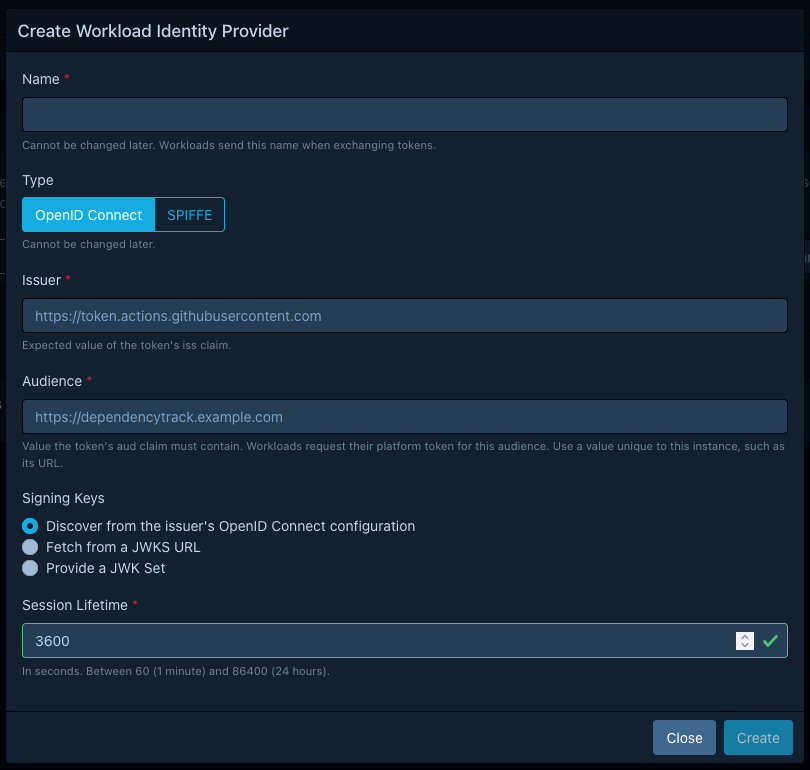
Fill in the form:
| Field | What to enter |
|---|---|
| Name | A short name such as github-actions. Workloads send this name when they exchange a token, and it can't change later. |
| Type | OpenID Connect for CI systems, cloud platforms, and Kubernetes. SPIFFE for SPIRE and other SPIFFE implementations. It can't change later. |
| Issuer | The exact value of the token's iss claim. For SPIFFE, the bare trust domain, such as example.org. |
| Audience | The value the token's aud claim must contain. |
| Signing Keys | Where the public keys come from. See Choose a key source. |
| Session Lifetime | How long sessions from this provider last, in seconds. Between 60 and 86400, and 3600 by default. |
Dependency-Track fetches the keys while saving, and refuses the provider if that fails.
Register the same issuer twice if two groups of workloads need different session lifetimes or different audiences. A binding has no lifetime of its own.
Choose a key source
Discover from the issuer's OpenID Connect configuration is the default for OpenID Connect providers, and the right choice whenever Dependency-Track can reach the issuer. It resolves the key set from the issuer's discovery document.
Fetch from a JWKS URL skips discovery. Use it for SPIFFE bundle endpoints, and for issuers whose discovery document isn't reachable but whose key set is.
Provide a JWK Set stores the keys in Dependency-Track and fetches nothing. Use it for issuers Dependency-Track can't reach at all, mainly self-managed Kubernetes clusters. Inline keys are never refreshed, so update the provider whenever the issuer rotates its keys.
Fetched URLs must use https. An issuer inside your network works, subject to the
outbound fetch constraints.
Bind a subject to the service account
Go back to Administration > Access Management > Service Accounts, expand the service account, and select the plus icon under Workload Identity Bindings.
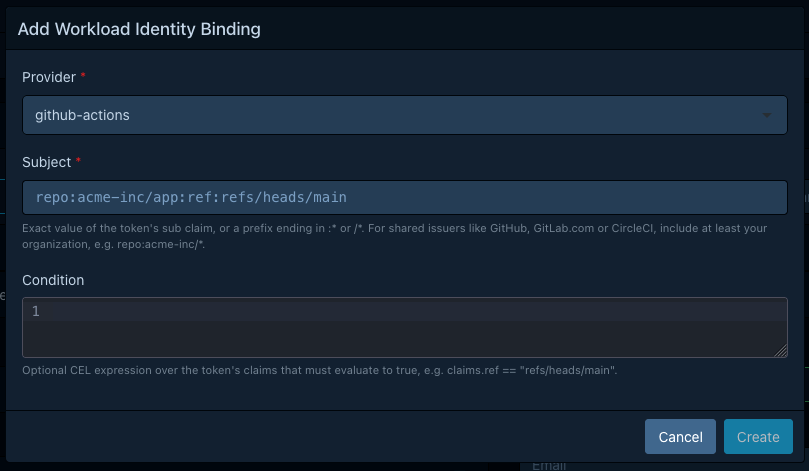
| Field | What to enter |
|---|---|
| Provider | The provider you registered. |
| Subject | The exact sub claim to accept, or a prefix of one. See subject matching. |
| Condition | Optional CEL expression over the token's claims, available as the claims map. |
On a shared issuer, make the subject prefix include at least your organization. See Subjects and conditions.
A service account can hold more than one binding. Dependency-Track uses the first that matches, in matching order.
To revoke access, delete the binding. Sessions already issued stay valid until they expire. To cut those off too, suspend the service account.
Exchange the token in the workload
The workload posts its platform token to /api/v2/oauth/token, a RFC 8693
token exchange endpoint. The request needs no authentication of its own.
ACCESS_TOKEN=$(curl -sSf -X POST \
  "https://dependency-track.example.com/api/v2/oauth/token" \
  -d "grant_type=urn:ietf:params:oauth:grant-type:token-exchange" \
  -d "subject_token_type=urn:ietf:params:oauth:token-type:jwt" \
  -d "subject_token=${PLATFORM_TOKEN}" \
  -d "workload_identity_provider=github-actions" \
  -d "service_account=ci-pipeline" \
  | jq -r .access_token)
Use the result as a bearer token:
curl -sSf -X POST "https://dependency-track.example.com/api/v1/bom" \
  -H "Authorization: Bearer ${ACCESS_TOKEN}" \
  -F "project=${PROJECT_UUID}" \
  -F "bom=@bom.json"
Exchange once per job and reuse the session for the rest of it. The session lives for the provider's session lifetime,
and no endpoint renews it. For the full parameter list and the error responses,
see the operations tagged OAuth in the REST API v2 reference.
Platform examples
Replace https://dependency-track.example.com with your instance URL, and acme-inc with your organization.
GitHub Actions
GitHub Actions issues OpenID Connect ID tokens from a single issuer shared by every account on GitHub.com, so the subject prefix has to carry your organization. GitHub's OIDC reference lists the claims and their current formats.
Provider:
| Field | Value |
|---|---|
| Name | github-actions |
| Type | OpenID Connect |
| Issuer | https://token.actions.githubusercontent.com |
| Audience | https://dependency-track.example.com |
| Signing Keys | Discover from the issuer's OpenID Connect configuration |
Binding, for every repository in the organization:
| Field | Value |
|---|---|
| Subject | repo:acme-inc/* |
| Condition | (none) |
Two subject formats exist
Repositories created after 2026-07-15, and older ones that opt in,
use an immutable subject
that carries numeric IDs, such as repo:acme-inc@123456/app@456789:ref:refs/heads/main.
A prefix of repo:acme-inc/* doesn't match it. Use repo:acme-inc@123456/* for those repositories,
and add a second binding if your organization has both formats in use.
The job needs the id-token: write permission, and requests the token for your audience:
jobs:
  upload-bom:
    runs-on: ubuntu-latest
    permissions:
      id-token: write
      contents: read
    steps:
    - name: Upload BOM
      env:
        DT_URL: https://dependency-track.example.com
      run: |
        PLATFORM_TOKEN=$(curl -sSf \
          -H "Authorization: bearer ${ACTIONS_ID_TOKEN_REQUEST_TOKEN}" \
          "${ACTIONS_ID_TOKEN_REQUEST_URL}&audience=${DT_URL}" | jq -r .value)
        # Exchange PLATFORM_TOKEN as shown above.
ACTIONS_ID_TOKEN_REQUEST_URL already carries a query string, which is why the audience is preceded by &.
GitLab CI
GitLab CI issues ID tokens from the URL of the GitLab instance. On GitLab.com every account shares that issuer, so the subject prefix has to carry your group. GitLab's ID token authentication guide lists the claims and their current formats.
Provider:
| Field | Value |
|---|---|
| Name | gitlab |
| Type | OpenID Connect |
| Issuer | https://gitlab.com, or the URL of your instance |
| Audience | https://dependency-track.example.com |
| Signing Keys | Discover from the issuer's OpenID Connect configuration |
The job declares the token and the audience it wants:
upload-bom:
  id_tokens:
    DT_TOKEN:
      aud: https://dependency-track.example.com
  script:
  - ./upload-bom.sh  # Exchanges $DT_TOKEN as shown in "Exchange the token in the workload".
Matching on the environment requires a condition
The GitLab subject is project_path:{group}/{project}:ref_type:{type}:ref:{branch}.
It only names the project and the git ref. The deployment environment lives in separate claims,
so a rule such as "only the job that deploys to production" doesn't fit into a subject at all.
Write it as a condition:
| Field | Value |
|---|---|
| Subject | project_path:acme-inc/* |
| Condition | claims.environment == "production" && claims.environment_protected == "true" |
Note
GitLab encodes the boolean-looking claims environment_protected and ref_protected as the
strings "true" and "false", so claims.environment_protected == true never matches.
The environment claim only appears on jobs that declare an environment:. A condition that
reads a missing claim raises an error, and a binding whose condition errors doesn't match,
so this binding rejects every job that isn't a deployment.
Kubernetes
A pod authenticates with a projected service account token.
The subject is system:serviceaccount:{namespace}:{name}.
A cluster set up with kubeadm issues tokens from the cluster-internal issuer
https://kubernetes.default.svc.cluster.local. That name only resolves inside the cluster,
so Dependency-Track can't run discovery against it. Store the keys inline instead:
kubectl get --raw /openid/v1/jwks
Provider:
| Field | Value |
|---|---|
| Name | k8s-prod |
| Type | OpenID Connect |
| Issuer | The cluster's issuer, exactly as it appears in iss |
| Audience | https://dependency-track.example.com |
| Signing Keys | Provide a JWK Set, pasting the output of that command |
Where Dependency-Track can reach the cluster's discovery document, as with many managed offerings, use the cluster's issuer URL with discovery and skip the manual key set.
Binding, for one service account:
| Field | Value |
|---|---|
| Subject | system:serviceaccount:ci:bom-uploader |
The pod asks for a token with the right audience through a projected volume:
spec:
  serviceAccountName: bom-uploader
  containers:
  - name: upload-bom
    image: acme-inc/upload-bom:1.0.0
    volumeMounts:
    - name: dt-token
      mountPath: /var/run/secrets/dependency-track
      readOnly: true
  volumes:
  - name: dt-token
    projected:
      sources:
      - serviceAccountToken:
          audience: https://dependency-track.example.com
          expirationSeconds: 3600
          path: token
The container reads the token from /var/run/secrets/dependency-track/token and sends it as subject_token.
The kubelet refreshes the file, so read it right before each exchange.
SPIFFE and SPIRE
SPIFFE workloads present JWT-SVIDs, which may omit the iss claim and
carry their trust domain in the subject instead. Register them with type SPIFFE.
Provider:
| Field | Value |
|---|---|
| Name | spire |
| Type | SPIFFE |
| Issuer | example.org, the bare trust domain without spiffe:// |
| Audience | https://dependency-track.example.com |
| Signing Keys | Fetch from a JWKS URL, pointing at the trust domain's bundle endpoint |
Only bundle endpoints with a publicly trusted certificate work,
which is the https_web profile of SPIFFE federation.
For a trust domain without such an endpoint, export the bundle and store it inline:
spire-server bundle show -format spiffe
Binding:
| Field | Value |
|---|---|
| Subject | spiffe://example.org/ci/* |
| Condition | (none) |
A SPIFFE prefix must end with /. Changing the trust domain of the provider stops every one of
its bindings from matching, so update their subjects afterwards.
The workload fetches its JWT-SVID for the audience from the SPIRE agent:
spire-agent api fetch jwt -audience https://dependency-track.example.com
Verify the setup
Run the exchange once from the workload, then confirm the identity that its session carries:
curl -sSf "https://dependency-track.example.com/api/v1/user/self" \
  -H "Authorization: Bearer ${ACCESS_TOKEN}"
The username in the response is the service account, prefixed with svc:.
The binding's Last used timestamp updates on every successful exchange, which is the quickest way to tell whether a binding is the one that matched.
Troubleshooting
The exchange endpoint returns the same invalid_request error whatever went wrong,
so it never names the failing check. The API server log records every refused exchange as a security event,
including the token's claims when the token verified but no binding matched.
See also
- About workload identity federation for the model behind providers, bindings, and sessions.
- Workload identity reference for subject matching rules, the condition environment, and token requirements.
- REST API v2 reference for request and response schemas.
- Permissions for what to grant the service account.
