Managing secrets
Dependency-Track integrates with third-party systems, most of which require some sort of credential to authenticate with them: API keys, passwords, or access tokens. Such secrets must be stored securely to prevent leakage.
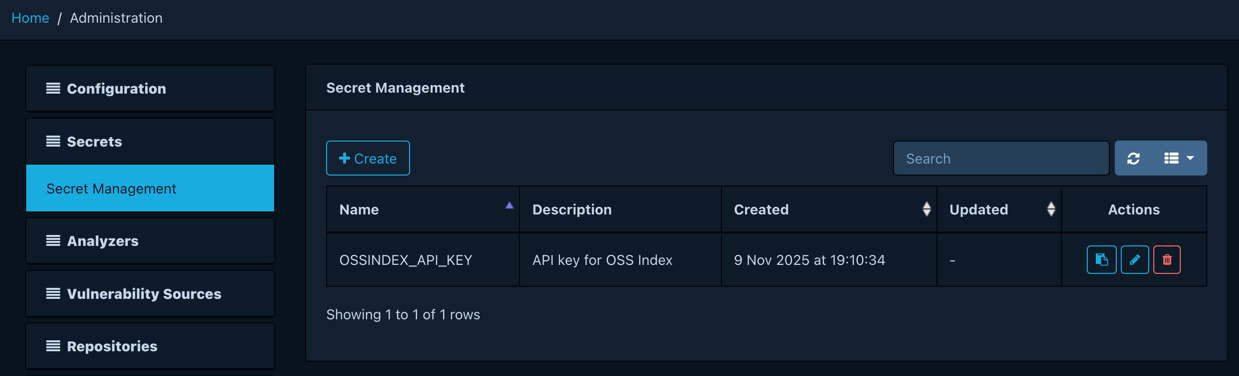
Dependency-Track offers centralized secret management. Changes made here become immediately available to all nodes in a cluster, without the need to restart them.
Depending on the capabilities of the configured provider, secrets can be created, updated, and deleted.
Info
You cannot view the value of secrets after creating them. Secrets are decrypted by the platform as needed, but never disclosed via REST API or user interface.
Creating secrets
Users with the SECRET_MANAGEMENT or SECRET_MANAGEMENT_CREATE permission
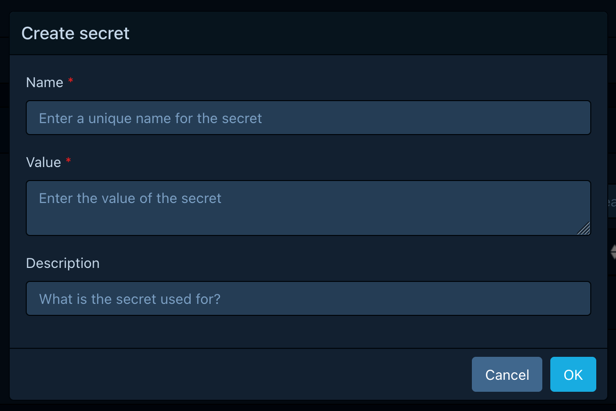
can create new secrets by clicking the Create button. This opens a
dialogue asking for the following information:
- A unique name for the secret
- The value of the secret
- An optional description
Updating secrets
Users with the SECRET_MANAGEMENT or SECRET_MANAGEMENT_UPDATE permission
can update existing secrets by clicking the button
in the Actions column of the secret. This opens a dialogue asking for
the following information:
- The new secret value
- An optional description
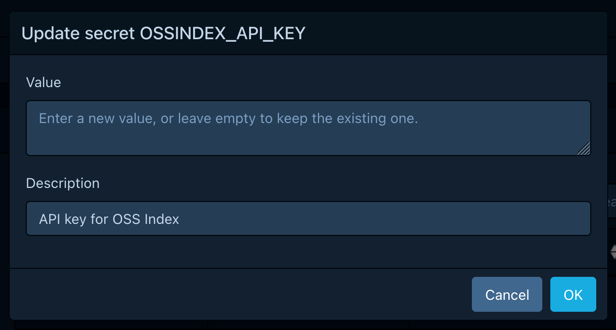
Leaving the value input empty keeps the existing value. If a new value is provided, the old value is irrevocably overwritten.
Deleting secrets
Users with the SECRET_MANAGEMENT or SECRET_MANAGEMENT_DELETE permission
can delete existing secrets by clicking the button
in the Actions column of the secret. This opens a dialogue asking for
confirmation.
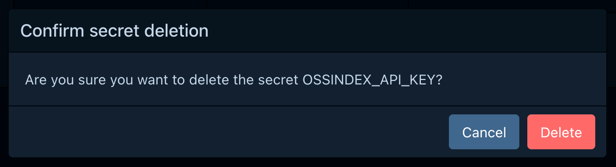
Deleted secrets cannot be restored. Proceed with caution.
Using secrets
Secrets can be used in configuration fields marked with  .
.

These fields offer dropdown and search capabilities, making it easy to discover available secrets.
