Vulnerability Policies
Introduction
Vulnerability policies let organisations encode how specific vulnerabilities should be triaged across the portfolio. Where a standard policy raises violations, a vulnerability policy acts on the finding itself. It applies an analysis (state, justification, vendor response, details), optionally overrides the vulnerability's ratings, and can suppress the finding altogether.
Typical use cases include:
- Suppress a CVE that has been assessed as not applicable to a given component or project.
- Downgrade or upgrade a vulnerability's severity based on organisational context.
- Centralise triage decisions so that every project benefits from them automatically, including projects imported in the future.
Policies are evaluated every time a project's vulnerabilities are analysed. Analyses applied by a policy populate the finding's audit trail in the same way as a manual analysis.
Why Not VEX?
CycloneDX VEX and VDR can also communicate triage decisions. Vulnerability policies complement them rather than replace them. The important differences are:
- VEX analyses are static. A VEX statement records a decision for a specific finding at a specific point in time. Vulnerability policies are rules. A single policy can match many findings now and in the future, based on conditions such as component version ranges, project tags, or dependency graph relationships.
- VEX cannot express constraints. A policy condition can say "apply this decision only while the
affected component is reached through Spring Cloud" or "only for projects tagged
3rd-party". VEX cannot do this. - VEX has no built-in expiration or scope change. A policy has a validity window and can be edited or removed centrally. When it stops matching, the analyses it applied are automatically reverted.
Policy Sources
A vulnerability policy originates from one of two sources:
| Source | How it is managed | Editable |
|---|---|---|
| User | Created and edited directly in Dependency-Track | Yes |
| Bundle | Synchronised from a remote ZIP archive of YAML files | No |
Both sources share a single namespace. Policy names are globally unique across user-managed and bundle-managed policies. If a bundle sync encounters a policy whose name is already taken by a user-managed policy, the sync fails rather than silently overwriting either side.
Info
Bundle-managed policies are displayed with a lock icon and cannot be edited or deleted. To change a bundle policy, edit it in its source repository and re-sync the bundle.
Evaluation
Each policy is evaluated once per (component, vulnerability) pair. When multiple policies match the
same finding, the policy with the highest priority value wins, and only its analysis and ratings are
applied. When two or more matching policies have the same priority, the policy that was created first
wins.
Validity Window
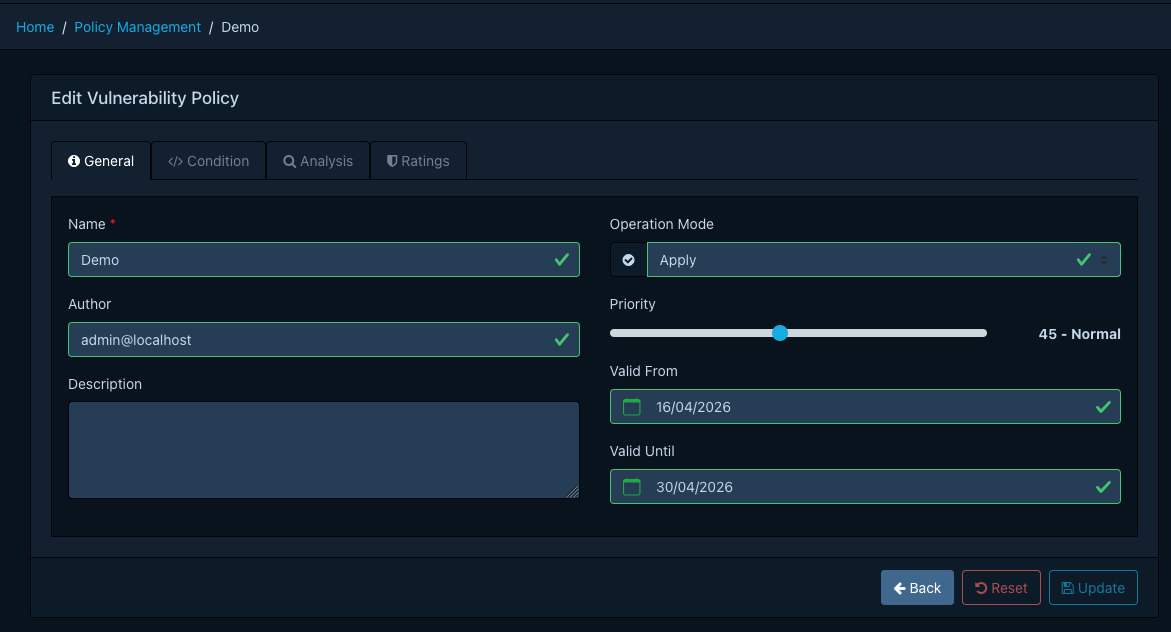
A policy is evaluated only while the current time falls within its Valid From and Valid Until timestamps. Both bounds are optional. A policy with neither bound is always active.
When a policy leaves its validity window (for example because Valid Until has elapsed, or because the policy is deleted), any analyses and rating overrides that were applied by it are automatically reverted on the next evaluation. The finding returns to whatever state it would have without the policy, or to the decision of the next-highest-priority policy that still matches. This makes it safe to use time-bounded policies for temporary suppressions, embargoes, or phased rollouts.
Operation Modes
Every policy has an operation mode that determines what happens when its condition matches.
| Mode | Behaviour |
|---|---|
| Apply | Apply the analysis and ratings to the finding. This is the default. |
| Log | Record that the policy matched, but do not modify the finding. Useful for validating a new policy. |
| Disabled | The policy is not evaluated at all. |
Tip
Log mode is particularly useful when introducing a new policy. It lets you observe how often a policy would match without risking unintended suppression of real findings. Once confident, switch to Apply.
Condition
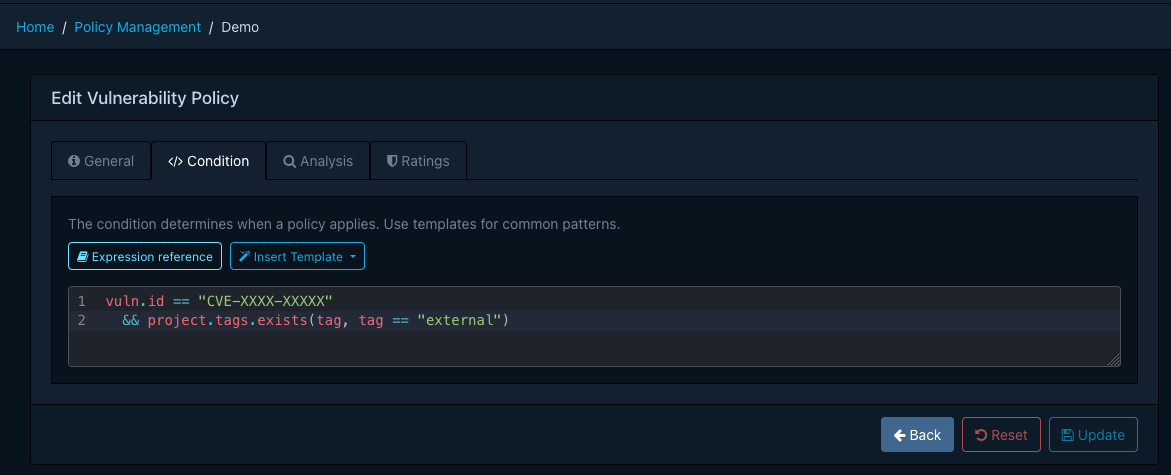
Conditions use the same Common Expression Language syntax, functions, and variables
as standard policy expressions, with one exception: A vulnerability policy is scoped to a
single vulnerability, exposed as the vuln variable, rather than a list of vulnerabilities.
| Variable | Type | Description |
|---|---|---|
vuln |
Vulnerability | The vulnerability being evaluated |
component |
Component | The component the vulnerability applies to |
project |
Project | The project the component belongs to |
now |
google.protobuf.Timestamp |
The current time at the start of evaluation |
Tip
Because vuln is a single object rather than a list, constructs like vulns.exists(...) from
standard policies become direct field accesses such as vuln.id == "CVE-2022-41852". Everything
else works identically, including matches_range,
is_dependency_of, has(), and the full CEL standard library.
Refer to the expressions reference for the complete function list.
Analysis and Ratings
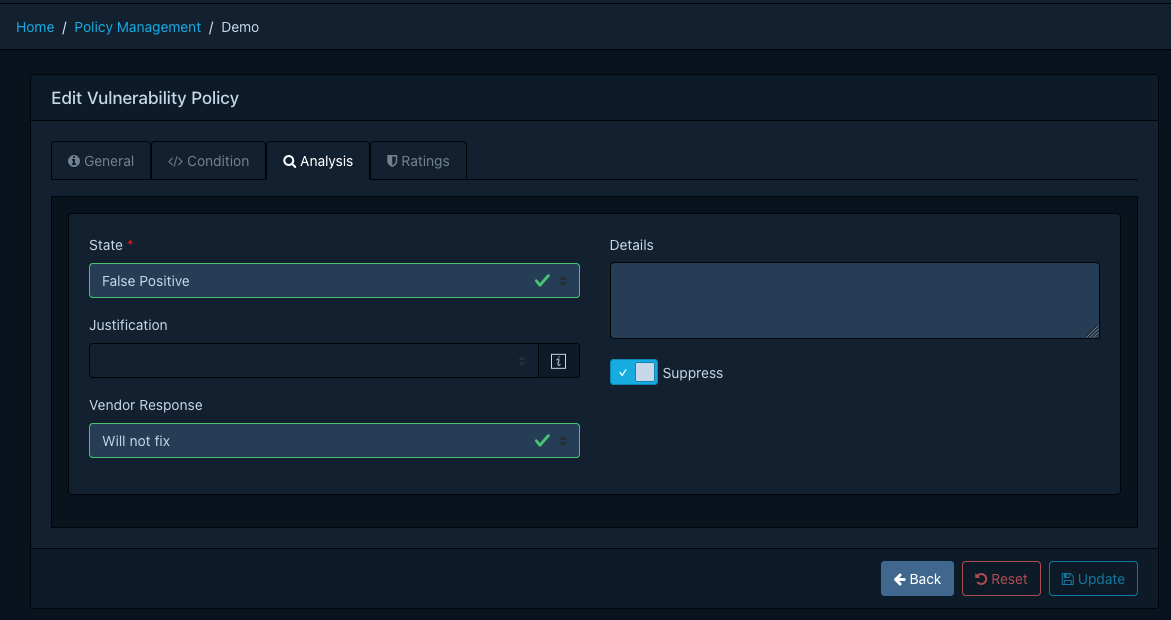
When a policy matches in Apply mode, Dependency-Track applies the policy's analysis to the finding:
- State (required). One of
EXPLOITABLE,IN_TRIAGE,FALSE_POSITIVE,NOT_AFFECTED,RESOLVED. - Justification. Only applicable when the state is
NOT_AFFECTED. Follows the CycloneDX VEX values (for exampleCODE_NOT_REACHABLE,PROTECTED_BY_MITIGATING_CONTROL). - Vendor response. The response communicated to consumers (
CAN_NOT_FIX,WILL_NOT_FIX,UPDATE,ROLLBACK,WORKAROUND_AVAILABLE). - Details. Free-form text explaining the analysis.
- Suppress. Whether to suppress the finding.
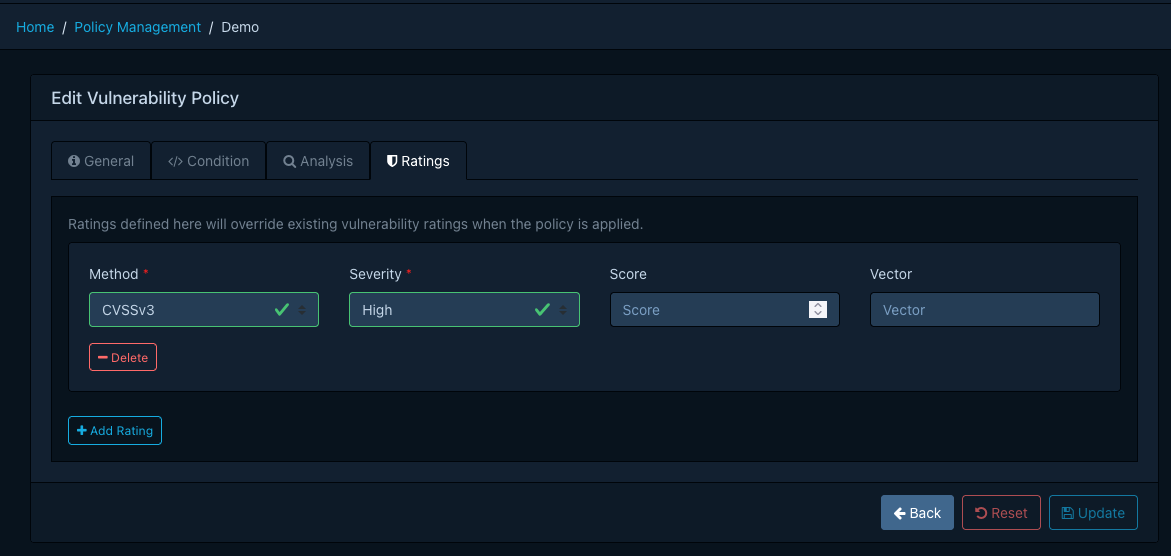
Up to three ratings may be attached to a policy. Each rating specifies a method (CVSSv2, CVSSv3,
CVSSv4, OWASP), a severity, and optionally a score and vector. Ratings are how a policy raises or
lowers the perceived severity of a vulnerability for your organisation, for example by enriching a CVSS
vector with environmental metrics.
Managing Policies
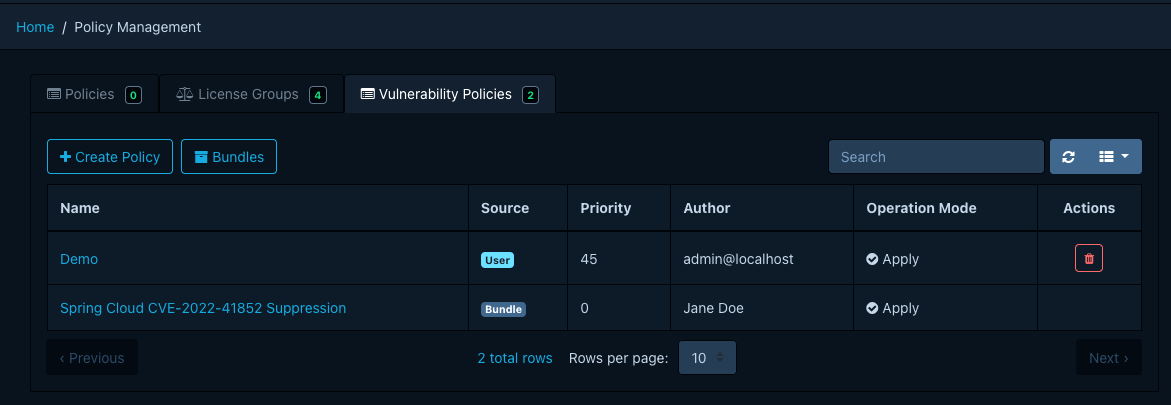
Vulnerability policies are managed under Policy Management → Vulnerability Policies. The required
permission is POLICY_MANAGEMENT, or one of the finer-grained POLICY_MANAGEMENT_CREATE,
POLICY_MANAGEMENT_READ, POLICY_MANAGEMENT_UPDATE, POLICY_MANAGEMENT_DELETE.
Creating a Policy
- Click Create Policy to open the editor.
- On the General tab, provide a name, optional description and author, an operation mode, and a
priority between
0and100. Higher values are evaluated first. Optionally set a validity window. - On the Condition tab, write a CEL expression. The editor offers autocompletion for the available variables and functions, and a template dropdown with common patterns.
- On the Analysis tab, pick the state and any additional analysis fields to apply when the policy matches.
- On the Ratings tab, optionally add up to three rating overrides.
- Click Create.
Editing and Deleting
User-managed policies can be edited or deleted from the list view. Bundle-managed policies appear read-only and must be changed at the bundle source.
Managing Policies via Bundles
A bundle is a ZIP archive of YAML files, one per policy, hosted on an HTTP(S) endpoint that Dependency-Track fetches on a schedule. Bundles are suited for centrally curated policy sets that are reviewed, versioned, and distributed alongside other infrastructure-as-code.
Info
Bundles are provisioned through server configuration. A single default bundle is currently supported. The data model has been prepared for multiple bundles in a future release, but creating additional bundles from Dependency-Track itself is not yet available.
Configuring the Bundle Source
Configure the bundle URL and (optionally) credentials on the API server.
| Property | Description |
|---|---|
dt.vulnerability.policy.bundle.url |
HTTP(S) URL of the bundle ZIP |
dt.vulnerability.policy.bundle.auth.username |
Basic-auth username |
dt.vulnerability.policy.bundle.auth.password |
Basic-auth password |
dt.vulnerability.policy.bundle.auth.bearer.token |
Bearer token, used when no basic-auth is configured |
dt.task.vulnerability-policy-bundle-sync.cron |
Cron expression for the scheduled sync |
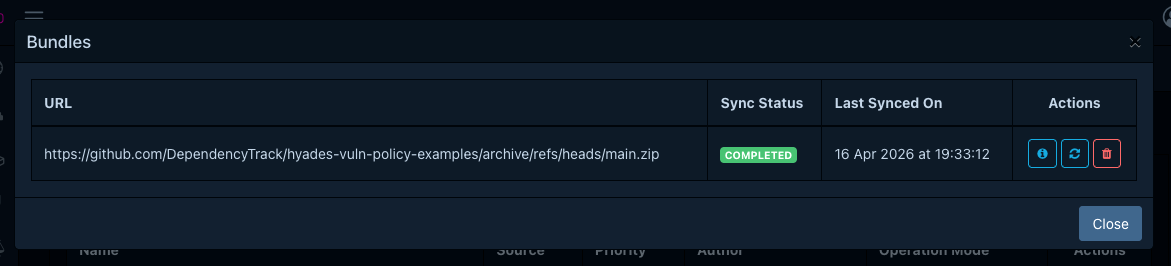
Once the URL is configured, Dependency-Track fetches the bundle on the configured schedule. A bundle whose digest matches the last successful sync is skipped. An administrator may also trigger an immediate sync from Policy Management → Vulnerability Policies → Bundles → Sync.
Bundle Layout
A bundle is a plain ZIP archive of YAML files at the root. File names must end in .yaml or .yml and
must not start with . or _. Non-YAML files are ignored.
The following size limits apply to protect the sync job from denial-of-service.
- The bundle ZIP must not exceed 10 MiB.
- It may contain at most 1000 entries.
- Each individual YAML file must not exceed 1 MiB.
Policy File Format
Each YAML file is a single policy. The schema is validated on every sync. If any policy in the bundle fails to validate, the entire bundle is rejected and the database is left untouched.
Example policy file: cve-2022-41852.yaml
The top-level fields are:
| Field | Required | Description |
|---|---|---|
apiVersion |
Yes | Schema version. Currently v1.0. |
type |
Yes | Must be the literal string Vulnerability Policy. |
name |
Yes | Globally unique policy name. |
description |
No | Short description, up to 512 characters. |
author |
No | Free-form author identifier. |
validFrom |
No | RFC 3339 timestamp. The policy is inactive before this instant. |
validUntil |
No | RFC 3339 timestamp. The policy is inactive after this instant. |
condition |
Yes | CEL expression. |
analysis |
Yes | Analysis to apply on match. See above. |
ratings |
No | Up to 3 rating overrides. |
operationMode |
No | APPLY (default), LOG, or DISABLED. See above. |
priority |
No | Integer between 0 and 100. Higher values are evaluated first. Defaults to 0. |
Sync Behaviour and Conflicts
Each sync reconciles the bundle with the database:
- Policies present in the bundle but absent from the database are created.
- Policies present in both are updated in place.
- Policies previously synced from the bundle but no longer present are deleted. Any analyses applied by those policies are reset and an audit trail entry is recorded.
- User-managed policies are never touched, regardless of whether they appear in the bundle.
A sync is aborted without any database changes when:
- The bundle exceeds the size or entry limits.
- The ZIP is malformed, or the bundle file is not reachable.
- Any policy file fails schema validation or its CEL condition fails to compile.
- The bundle contains two policies with the same
name. - The bundle introduces a policy whose
namealready exists as a user-managed policy.
The last failure reason is surfaced in the Bundles view so that operators can diagnose sync issues without needing access to the server logs.